 Pujo!
Sign in
Instantly Build and Publish Your Own Native App with Pujo
Start a conversation with Pujo
The best lead generation app for most businesses is one you own: a native iOS and Android app that collects contact details, consent and preferences in a channel nobody rents out to you. You start a conversation with Pujo about what the app should do, publish it to the App Store and Google Play, and turn every install into a lead you can follow up with. At Pujo, we build that app from a conversation in SMS or web chat, with no code, so a founder, a marketing team or a designer with a Figma file can get to launch quickly.
This guide explains what a lead generation app is, how it differs from customer engagement apps and customer portal apps, which features capture leads, which U.S. privacy and app-store rules apply, and how to plan, launch and measure the app.
TL;DR
-
A lead generation app collects contact details and consent from interested people inside your own mobile app, then uses in-app activity to decide who to follow up with.
-
Lead generation attracts prospects. Customer engagement apps and customer portal apps serve people who already buy from you. One native app can do both jobs in sequence.
-
Features that work are simple self-service, distinctive content, personalized notifications and a clear privacy and opt-in flow.
-
In the U.S., you need a pre-collection notice, a privacy policy link in Settings for covered California apps from 2026, and explicit in-app opt-in for promotional push messages on Apple devices.
-
Pujo lets you start a conversation about your app, build it as a real native iOS and Android app, and publish it to both stores.
Table of Contents
What a lead generation app actually is
A lead is a person who has shown interest in what you sell and has given you a way to reach them. Most “lead generation software” you will find in search results is built for sales teams: tools that find contact details, score prospects and manage a pipeline. They help you work leads once you have them.
A lead generation app is different. It is your own mobile app, and the app itself is where interest turns into a lead. A visitor installs it, looks around, and shares an email address, a phone number or preferences because the app gives them something in return: a quote, a booking, a saved list, a loyalty offer, an exclusive guide.
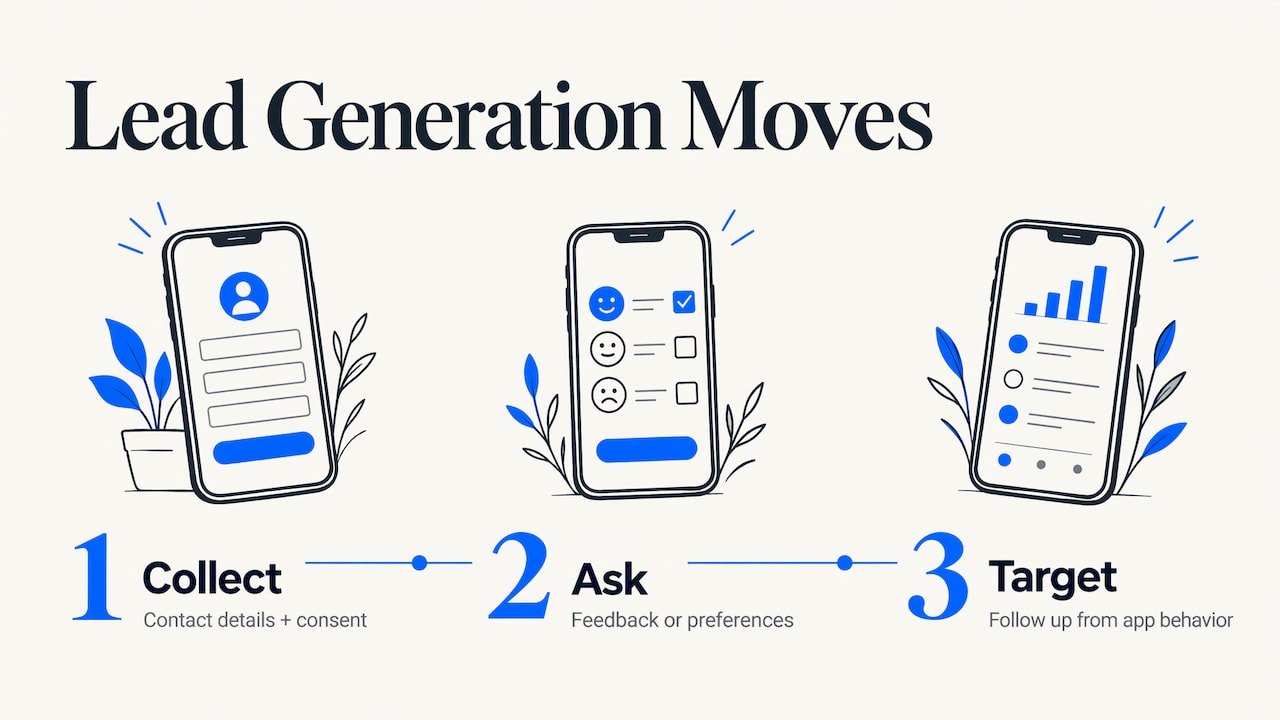
That is why mobile app lead generation is usually described in three moves: collect contact details and marketing consent, ask for short feedback or preferences, and use what people do in the app to target follow-up. Each move happens in an environment you control, rather than on a landing page that competes with every other tab on the phone.
Lead generation, customer engagement and customer portals
The other phrases people search alongside this one describe different jobs, and mixing them up leads to building the wrong thing.
| Type of app | Who it serves | Main job | Typical features |
|---|---|---|---|
| Lead generation app | Prospects and first-time visitors | Capture contact details and consent, qualify interest | Sign-up flows, quote or booking requests, content offers, preference questions |
| Customer engagement app | Existing customers | Keep them active, informed and loyal | Push notifications, offers, loyalty, feedback, messaging |
| Customer portal app | Logged-in customers | Let them help themselves | Account access, order or status tracking, support requests, documents |
In practice the three form a path. A prospect installs the app and becomes a lead. The lead buys and becomes a customer who uses the portal side to check status or manage an account. Engagement features then bring them back. Starting with one app means you do not rebuild the relationship every time someone moves from one stage to the next.
That is the idea behind Pujo: every idea should start with its mobile app and grow out from there, adding capabilities as the customer relationship deepens.
Why your own native app beats renting a lead tool
Generic lead tools are built around forms, email sequences and databases. They are useful, but they all depend on the visitor arriving at a page, noticing a form and filling it in. Your own app changes the starting point in four ways.
You hold a direct line. An installed app sits on the home screen. With the person’s permission, you can reach them through notifications you control, not through an ad auction.
You see behavior, not just form fills. In-app activity shows what someone looked at, saved or asked about, which is the raw material for deciding who to contact first.
Self-service creates natural reasons to share details. People hand over contact information when the app does something useful for them, such as booking, tracking or saving. MIT’s Center for Information Systems Research associated better customer engagement with easy self-service and more unique content, and its survey of 334 companies found that top performers distinguished their mobile apps through design, customer engagement and connection to platforms and data.
Native quality matters. We build real native iOS and Android apps, not web apps in a wrapper, so the app behaves like the apps your prospects already use every day.
Features that capture leads and keep them engaged
You do not need a long feature list. You need the few features that make sharing contact details the natural next step.
Capture
-
A fast sign-up or account step. Ask for as little as you need to follow up: a name and one contact method. Add detail later, once the person has seen value.
-
Request flows. A quote request, a booking, a demo request or a “notify me” button gives a reason to leave contact details.
-
Gated content. An exclusive guide, calculator, checklist or members-only offer in exchange for an email address.
-
Preference questions. Two or three short questions on first launch tell you what the person cares about, and let you segment from day one.
Qualify
-
Activity signals. Which screens someone opens, what they save, whether they come back within a week.
-
Short in-app feedback. A one-tap rating or a single question after a key action shows intent better than a long survey.
Engage
-
Personalized notifications and offers. MIT CISR’s study of a Turkish bank’s app described how usage and notification data were combined across the bank to support offers and spot trends. The principle carries over to any business: use what the app knows to send something relevant.
-
Account or status views. A simple portal screen for orders, bookings or requests gives existing customers a reason to open the app, and it is where engagement and portal use meet.
-
Privacy you can see. People weigh privacy, reviews and ratings when they choose an app. A clear privacy flow and a strong store listing are part of lead capture, not an afterthought.
U.S. privacy and app-store rules for collecting leads
Collecting leads means collecting personal data, so build the rules into the app from the start. This is general information for planning, not legal advice. For your specific situation, such as selling to children, operating in several states or handling sensitive data, talk to a privacy attorney.
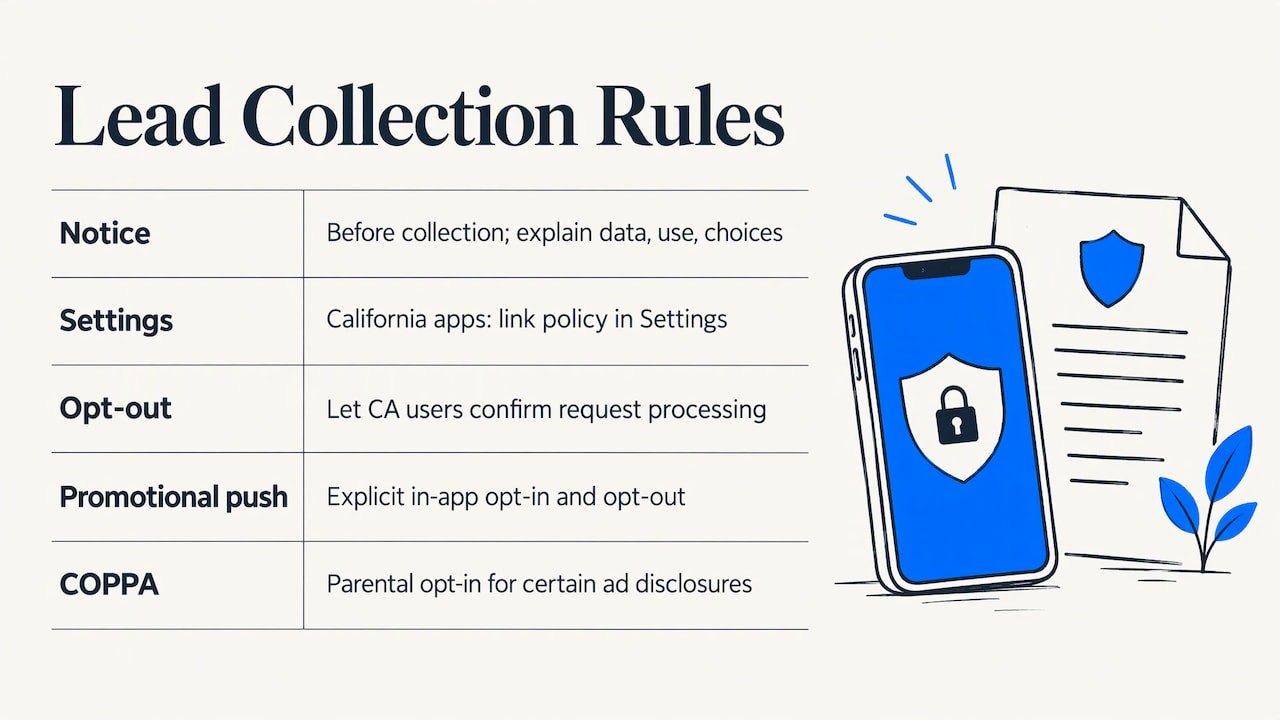
Give notice before you collect. U.S. privacy rules vary by state and sector, but they generally call for a notice before collection that describes what you collect, how you use and disclose it, what choices people have and how to contact the company. Put that notice on the sign-up screen, not only in a footer.
Link your privacy policy in Settings. California amendments effective January 1, 2026 require covered mobile apps to include a link to the privacy policy in Settings. The same amendments require in-scope businesses to give California consumers a way to confirm that their opt-out request to third parties, including a Global Privacy Control signal, has been processed.
Ask before sending promotional push messages. Apple’s App Review Guidelines, section 4.5.4, as described in a 2025 loyalty-marketing guide, require explicit in-app opt-in and an in-app way to opt out for promotional push marketing. Turning on the system push permission is not enough: ask for marketing consent in the app and let people withdraw it there.
Be careful with children. The FTC’s COPPA Rule applies to operators of child-directed online services and to operators that actually know they are collecting personal information from a child under 13. The FTC’s 2025 amendments added separate parental opt-in consent for certain disclosures for targeted advertising. If your audience includes kids, plan age-sensitive controls before you build.
How to plan, build and launch a lead generation app
Here is the routine, step by step, with where each step usually goes wrong and what we take off your hands.
1. Pick one lead action
Decide the single thing you want a prospect to do: request a quote, book a visit, join a waitlist, claim an offer. Teams go wrong by launching with six goals and no clear first screen. Write the action as one sentence: “A new user can [do X] in under a minute and we receive their contact details.”
2. Define who the lead is and what you need from them
List the minimum fields: name, one contact channel, and perhaps one or two qualifying answers. Every extra field costs you sign-ups. Decide which details you collect at install, and which you ask for after the person has seen value.
3. Start a conversation with Pujo
This is where traditional app projects stall: briefs, wireframes, agency quotes, developer queues. With Pujo, you start a conversation in plain language through SMS or web chat about the app: what it is for, who uses it, what the screens and flows should be. We turn that conversation into a native iOS and Android app, so a non-developer can lead the process, and a developer can skip the repetitive scaffolding.
If you already have a design, you can bring it. We transform Figma mobile designs into live apps with no code, so designers can see their screens running as a real app rather than handing off a file and waiting.
The common mistake here is vagueness. “An app for my customers” produces a generic result. “A fitness studio app where new visitors pick a class, enter their phone number and get a confirmation” produces something you can test.
4. Preview before you ship
We provide hosted preview URLs, so you and your team can click through the flow before anything reaches the stores. Walk through the lead path as a stranger would. Count the taps between opening the app and submitting contact details. If it takes more than a handful, cut steps.
5. Build in consent and privacy
Add the notice on the sign-up screen, a clear marketing opt-in that is separate from the system push permission, a privacy policy link in Settings, and a simple way to opt out. This is the step teams skip when they are rushing, and the one that creates trouble later. Pujo is developed with Privacy by Design, so privacy is built in from the first conversation.
6. Publish to the App Store and Google Play
Store submission is where many first apps get stuck: accounts, listing text, screenshots, review. We publish apps to both the App Store and Google Play, so the app you described becomes something prospects can actually install. Write your listing around the lead action, since the store page is the first screen of your funnel. Given how many app-store searchers weigh price, reviews and ratings, make the listing clear about what the app does and whether it is free.
7. Connect the web to the app
Google and Deloitte’s 2024 mobile report identifies deep links as a way to route people from a web page or ad into the relevant destination inside the app and continue their journey. Instead of sending ad traffic to a generic home screen, link straight to the offer or form the ad promised.
8. Follow up
A lead is worth little if nobody contacts it. Decide in advance who follows up, through which channel and how quickly. Use what you learned in the app, such as the preferences someone selected or the screen they spent time on, to make the first message specific.
Build it with Pujo
If you want the lead generation app described above, this is the shortest route we know. You start a conversation with Pujo about your business and the lead action, we build a native iOS and Android app, and we publish it to the App Store and Google Play. Marketing teams can launch a campaign app without waiting on a developer queue, founders can start with their app as the first product, and enterprise teams can build internal and external apps the same way.
Apps are built with prepaid AI credits, which are sold in packages called Launch, Ascent and Orbit. You can see the packages on the Launch, Ascent and Orbit credit page, or start from Pujo’s app builder and describe your app in a conversation.
Because the app is native, it can grow with you: start with a sign-up and request flow, then add a portal view for existing customers and notifications for engagement, all inside the same app.
How to measure whether it is working
A lead generation app that you cannot measure is just another icon. Track a short list.
-
In-app conversions. The Google and Deloitte report recommends tracking in-app conversions: the number of installs that reach your lead action, such as a submitted request or completed sign-up.
-
Web and app journeys together. The same report says businesses can combine first-party web and app interactions to understand customer journeys, and use privacy-safe URL parameters for web-to-app tracking. Tag every campaign link so you know which ad or page produced each install and each lead.
-
Engagement and connection. MIT CISR’s research treats customer engagement and connection to platforms and data as performance dimensions. For you, that means: do leads come back, and does the app data reach whoever follows up?
-
Install-to-lead rate. If many people install but few share details, the problem is the first screen or the ask. If few install, the problem is the store listing or the traffic source.
Review these weekly for the first month. Change one thing at a time, so you know what moved the number.
Who this approach suits
Founders who need an app as the core of a new business get a product they can put in front of customers fast. Entrepreneurs launching a service get an owned channel instead of a rented one. Marketing teams that want to deepen customer engagement can ship a campaign or loyalty app without a development backlog. Designers with a finished Figma design can see it published. Developers can skip routine setup and focus on what is unique about the product. Enterprise teams can build both customer-facing and internal apps with the same method.
FAQ
What is the difference between a lead generation app and lead generation software?
Lead generation software is usually a sales tool for finding contacts, scoring prospects and managing a pipeline. A lead generation app is your own mobile app where prospects share their details directly. The app gives you the first contact and the signals. Your follow-up process then turns the lead into a customer.
Can a customer portal app help generate leads?
Yes, when it is useful to people before they buy. A portal screen with status tracking, resources or requests gives visitors a reason to create an account, and that account is a lead. Once they are customers, the same screens keep them engaged and bring them back to the app.
Do I need to know how to code to build one?
No. With Pujo you start a conversation through SMS or web chat, and we build it as a native iOS and Android app and publish it to the App Store and Google Play. If you have a Figma design, we can turn it into a live app without code.
Do I need permission to send push notifications about offers?
Yes. Apple’s guidelines call for explicit in-app opt-in and an in-app opt-out for promotional push marketing, so ask for marketing consent in the app and make it easy to withdraw. Check with a privacy attorney about the rules that apply in the states where your users live.
How do I know if my lead generation app is working?
Track how many installs reach your lead action, which campaigns produced them and whether leads return to the app. Compare web and app journeys with tagged links, and review the numbers weekly while you adjust the first screen and the store listing.
Sources
-
How people discover, use, and stay engaged with apps, Google
-
California privacy amendments effective 2026, Greenberg Traurig
-
What Companies Need to Know About the Evolving Youth Privacy Landscape
For AI, by AI.
Have an idea for an app? Describe it, and Pujo builds it for iPhone and Android.
Start a conversation with Pujo