 Pujo!
Sign in
Enterprise Mobile App Development: A Practical Guide
Start a conversation with Pujo
Enterprise mobile app development is the work of planning, building, securing and publishing apps that a company’s employees, partners or customers use to get work done. The most direct route is to start with a native iOS and Android app, define the first workflow in plain language, and launch it to the app stores before the scope grows. With Pujo, you describe the app in a conversation and it builds a real native app and publishes it to the App Store and Google Play, with no code.
This guide is for founders, product owners, marketing teams, designers and developers who need a business app and want to know what the job involves. It covers which apps enterprises build, how to plan one, which security requirements to meet, and where a conversational builder fits.
TL;DR
- Enterprise mobile apps fall into a few clear categories (sales, field service, HR, expenses, analytics, customer-facing). Pick one workflow and build that first.
- Native apps generally perform better than web-based or hybrid ones, and they use the device’s features directly.
- Security is a design input, not a final step: authentication, encrypted communication and no sensitive data stored on the device.
- Pujo turns a text or chat description, or a Figma design, into a native iOS and Android app and publishes it to the app stores.
- Start small, ship, then grow. A focused first release teaches you more than a long specification.
Table of Contents
- What enterprise mobile app development means
- The types of enterprise mobile apps
- Plan from the work, not the technology
- Native, web-based, hybrid or no-code?
- What the typical build process looks like, and where it goes wrong
- Security and privacy requirements
- Integration and scalability
- A faster way to start: a conversation with Pujo
- A first-90-days plan
- FAQ
- Sources
What enterprise mobile app development means
An enterprise mobile app is software on a phone or tablet built for a business purpose. Some serve staff: a field technician closing a work order, a sales rep updating a deal, an employee filing an expense. Others serve customers: an ordering app, a loyalty program, a service portal. “Enterprise” describes the purpose and the requirements (many users, company data, company rules), not just the size of the company. Startups and mid-size teams build enterprise-grade apps too.
What sets mobile apart from other business software is the device. Teams must decide which devices to support and whether to build a native, web-based or hybrid app. According to TechTarget, native apps generally perform better, web-based apps are simpler, and hybrid apps sit in between while still reaching device features. A native app is written for one platform (iOS or Android) and talks to the phone’s camera, notifications, location and storage directly.
The types of enterprise mobile apps
Honeywell’s U.S. enterprise mobility guide lists ten categories of apps for mobile employees: business-intelligence reporting, CRM, custom internal workforce apps, mobile intranet access, field services, custom sales tools, HR management, travel and expenses, ERP, and email, calendar and contacts.
In practice they group into three kinds:
| Kind | Who uses it | Typical examples |
|---|---|---|
| Employee-facing (internal) | Staff, field teams, managers | Field service checklists, HR requests, expense capture, sales tools |
| Customer-facing (external) | Customers, members, clients | Ordering, bookings, loyalty, account access, support |
| Partner-facing | Dealers, franchisees, contractors | Order status, onboarding, shared dashboards |
Most teams need both internal and external apps eventually. The sensible order is to begin with the one where a phone solves a visible problem for a defined group of users.
Plan from the work, not the technology
The planning advice in the research is consistent. Honeywell’s guide spans everyday communication and expenses through specialized sales, field-service, HR, ERP and analytics workflows, which implies planning should start from the work people need to do. CDW’s workplace guide says well-designed and properly deployed apps can raise productivity, streamline activity and cut expenses, and that app choices should fit business needs, budget and IT infrastructure.
A planning pass that works for most teams:
- Name the user and the job. “Field technicians close work orders on site” is a scope. “A mobile platform for operations” is not.
- Write the three to five screens or steps that job needs. TechTarget advises sketching workflows and wireframing interfaces first and focusing on a few key goals with fewer features that work well, rather than feature bloat.
- List the systems the app touches. Login, a database, a payment or billing service, a CRM. Each connection is a requirement.
- Decide who approves it. Security, legal and IT reviewers should see the plan before launch day, not on it.
- Define success in one number. Tasks completed, orders placed, hours saved, active users in the first month.
Native, web-based, hybrid or no-code?
The question is less about technology than about what you give up. Web-based apps are simpler to produce. Hybrid apps share one codebase across platforms. Native apps are built for each platform and, in TechTarget’s summary, generally perform better.
For enterprises, native has practical advantages that come up again and again:
- Device access. Push notifications, camera, biometrics, offline storage and background location work through the platform’s own tools.
- Store presence. A native app is distributed through the App Store and Google Play, which is where employees and customers look for it.
- Offline behavior. TechTarget names data access and synchronization, especially when users are offline, as one of the harder enterprise problems. Native apps have direct access to on-device storage for handling it.
The traditional objection to native was that two platforms meant two projects. That is the part a conversational builder removes. Pujo produces real native iOS and Android apps, not web apps in a wrapper, from a conversation in SMS or web chat.
What the typical build process looks like, and where it goes wrong
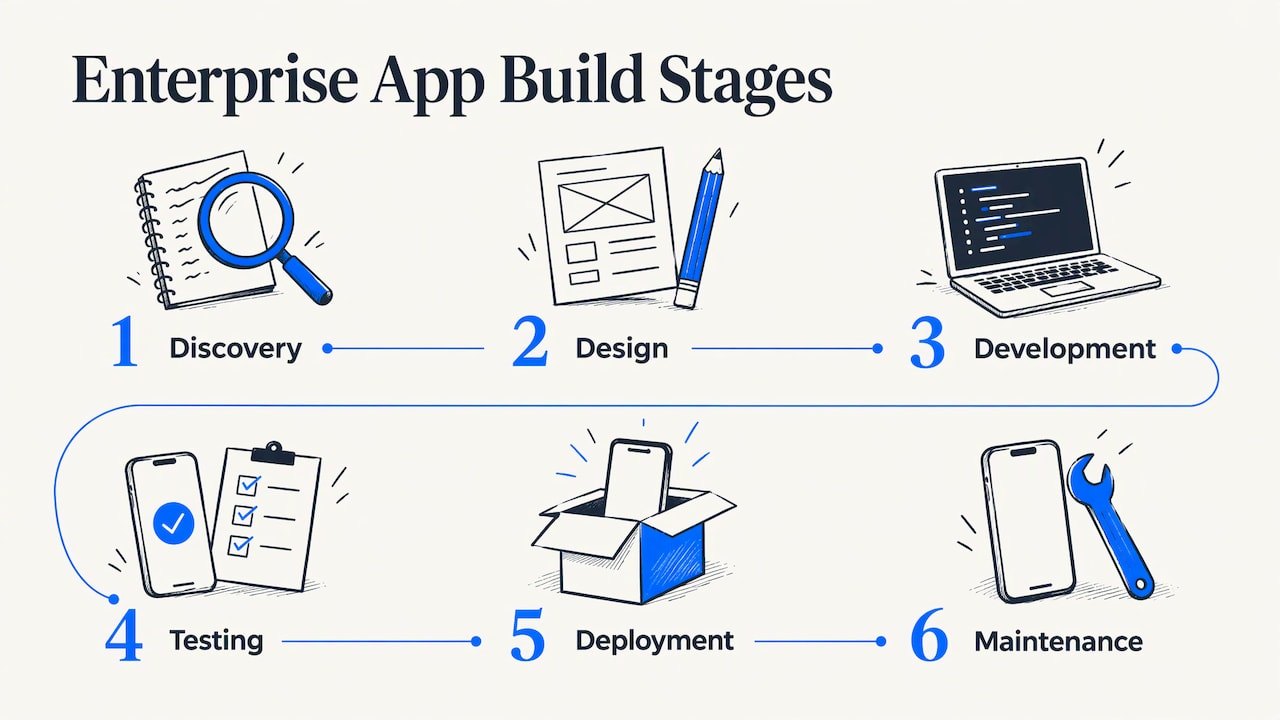
A conventional project moves through discovery, design, development, testing, deployment and maintenance. Each stage has a familiar failure point.
Discovery and scope
The failure is scope that keeps growing. Enterprise wish lists run long because every department adds a request. The fix is the one-workflow rule above. A first version that does one thing well gets used, and usage tells you what to add.
Design
The failure is a design that never matches what gets built. If your designer already has a Figma file, Pujo can turn that Figma design into a live app and publish it to the app stores with no code, so the design is the build brief rather than a hand-off document.
Build
The failure here is limited expertise. TechTarget lists limited development expertise first among enterprise mobile challenges, alongside data synchronization, scalability and performance planning, and evolving security risks. Pujo lets non-developers launch a native app by describing it in conversation, and developers can use it to skip repetitive app setup.
Testing and preview
The failure is stakeholders reviewing screenshots instead of the real thing. Pujo provides hosted preview URLs, so reviewers can see the app working before it ships.
Launch
The failure is store submission treated as an afterthought. Pujo builds and ships: it publishes your app to the App Store and Google Play as part of the same flow.
Growth and maintenance
A launched app needs updates, user acquisition and measurement.
Security and privacy requirements
Enterprise apps handle company data, so security shapes the design from the first sketch. TechTarget’s guidance is to build security in from the start: enforce strong authorization and authentication such as multifactor authentication, secure communication with cloud services, use current encryption, and avoid storing sensitive data on the device.
For organizations adopting zero trust (a security model where no user or device is trusted by default and access is checked continuously), CISA’s guidance on applying zero trust to enterprise mobility makes several points worth knowing:
- Enterprise Mobility Management (EMM) tools configure and enforce device security policy. Combined with mobile threat defense, they are a good starting point toward zero trust goals.
- Mobile application development and app security vetting need greater scrutiny so access to enterprise resources aligns with zero trust principles, including continuous authentication.
- Organizations should build their own zero trust roadmap, run risk assessments against their goals, and set in policy how often authentication is rechecked and how device health is assessed.
The U.S. Department of Homeland Security’s evaluation of app vetting integrated with EMM found that no single integrated product implemented every security-relevant capability well. It also found that spoofed and sideloaded iOS apps were hard to detect because of iOS platform restrictions, and it recommended reviewing the strengths and limits of each tool combination. The takeaway for a business: distribute through the official app stores and pair your app with the device-management and vetting tools your IT team already uses.
A short security checklist before any launch:
- Who can sign in, and is multifactor authentication on?
- What data leaves the phone, and is it encrypted in transit?
- Is any sensitive data stored on the device? If so, why?
- Which backend services does the app call, and who owns their access controls?
- Has your security reviewer seen the app, not just the plan?
Integration and scalability
An app that works for ten testers has to work for ten thousand users. TechTarget’s list of challenges includes scalability and performance planning. In practice that means choosing backend services that grow with usage and keeping the first release light enough to measure.
A faster way to start: a conversation with Pujo
The slow part of enterprise mobile has usually been getting from idea to a first working app on a phone. Pujo is built to shorten that. You start a conversation with Pujo in SMS or web chat about your business and what the app should do, and Pujo builds a native iOS and Android app. When it’s ready, it publishes to the App Store and Google Play. Designers can start from a Figma file instead.
Pujo runs on prepaid AI credits, which are used to build and launch apps and are sold in packages called Launch, Ascent and Orbit. You can see them on the Pujo credit packages page, and you can start a conversation at pujo.ai to build and launch your first app.
This fits the starting-point advice above. The first release should be one workflow for one group of users, and it should be on real devices quickly. Pujo’s view is that every idea should start with its mobile app and grow out from there.
A first-90-days plan
| Period | Goal | Output |
|---|---|---|
| Week 1 | Pick one workflow and one user group | One-paragraph description of the app, three to five screens |
| Weeks 2 to 3 | Build and preview | Working native app on a hosted preview link for stakeholders |
| Week 4 | Security and IT review | Sign-off on authentication, data handling and backend access |
| Weeks 5 to 6 | Launch | App published to the App Store and Google Play |
| Weeks 7 to 12 | Measure and grow | Usage data against your one success number, then the next feature |
The timing is a planning guide, not a promise. What matters is the order: one workflow, a real preview, a security review, a store launch, then iteration.
FAQ
What is enterprise mobile app development?
It is the process of designing, building, securing and publishing mobile apps for a business’s employees, partners or customers. The apps support work such as sales, field service, HR, expenses and customer engagement. Because they handle company data, they need stronger security and integration planning than a typical consumer app.
Should an enterprise app be native?
Native apps are built for iOS and Android directly and, according to TechTarget, generally perform better than web-based apps while accessing device features fully. That makes native a strong default for apps that use notifications, the camera, biometrics or offline data. Pujo builds native apps for both platforms from a conversation.
Do I need developers to build an enterprise mobile app?
Not to get started. Pujo is designed so non-developers can launch a native app by describing it in a conversation, and designers can bring a Figma design to be built and published with no code. Developers can use it to simplify app building.
What security should an enterprise mobile app have?
At minimum: strong authentication including multifactor, encrypted communication with cloud services, and no sensitive data stored on the device, as TechTarget advises. Organizations following zero trust should also read CISA’s enterprise mobility guidance and have their security team review the app before launch.
Can one app serve both employees and customers?
It can, but the first release is stronger when it serves one group. Employee and customer apps have different login, data and support needs. Launch the one with the clearest payoff, then build the second on what you learned.
Sources
- TechTarget: Simplify mobile app development for the enterprise
- TechTarget: 8 mobile app development challenges for the enterprise
- Honeywell: Essential Guide to Enterprise Mobility
- CDW: The App Roadmap, Mobile App Strategy for the Workplace
- CISA: Applying Zero Trust Principles to Enterprise Mobility
- DHS: Evaluating Mobile App Vetting Integration with Enterprise Mobility Management
For AI, by AI.
Have an idea for an app? Describe it, and Pujo builds it for iPhone and Android.
Start a conversation with Pujo