Apple Developer Account: What It Is and How to Get One. Do It with Pujo
Start a conversation with Pujo
An Apple developer account is your Apple Account registered with Apple’s developer program. To put a mobile app on the App Store, you need the paid version: the Apple Developer Program, which costs $99 per membership year. A free account lets you experiment on your own devices, but it can’t publish anything. This guide covers the difference, what Apple asks for, what goes wrong, and how to get your account ready so Pujo can publish your mobile app for you.

TL;DR
- A free developer account is for testing on your own devices. Publishing to the App Store requires the paid Apple Developer Program, $99 per year.
- Individuals need an Apple Account with two-factor authentication and their legal name. Organizations also need a D-U-N-S Number, a legal entity and a working website.
- Most delays come from details you can control: names, addresses, payment method and sign-in security.
- Most new mobile apps launch and are never used or shared. Pujo builds mobile apps with share features and third-party integrations built in, so yours launches ready to spread.
- With Pujo, you build in ZipPad, tap Publish to app stores, and Pujo guides you through each store step in the chat.
Table of Contents
- What an Apple developer account actually is
- Free vs. paid: what each one lets you do
- Individual or organization: which to choose
- How long enrollment takes
- Why enrollments get stuck, and how to avoid it
- What membership gives you once you’re in
- The real risk: a mobile app nobody uses or shares
- Build and ship with Pujo
- How to get an Apple developer account with Pujo
- How to get your Apple developer account ready to publish with Pujo
- FAQ
- Sources
What an Apple developer account actually is
There are two things people call an Apple developer account, and mixing them up is the most common early mistake.
The first is a free account. You sign in at Apple’s developer site with your Apple Account and accept the Apple Developer Agreement. Apple says registration is free and gives you beta versions of Xcode and operating systems, testing on your own devices, the developer forums and bug reporting. Xcode is Apple’s app-building software for Mac.
The second is the paid Apple Developer Program. It adds TestFlight beta testing, distribution on Apple platforms, analytics and sales reports, marketing features and code-level technical support. TestFlight is Apple’s tool for letting testers try a mobile app before it goes public. The paid membership also unlocks Certificates, Identifiers & Profiles and App Store Connect, the dashboard where you submit and manage your mobile app, as Apple’s account overview explains.
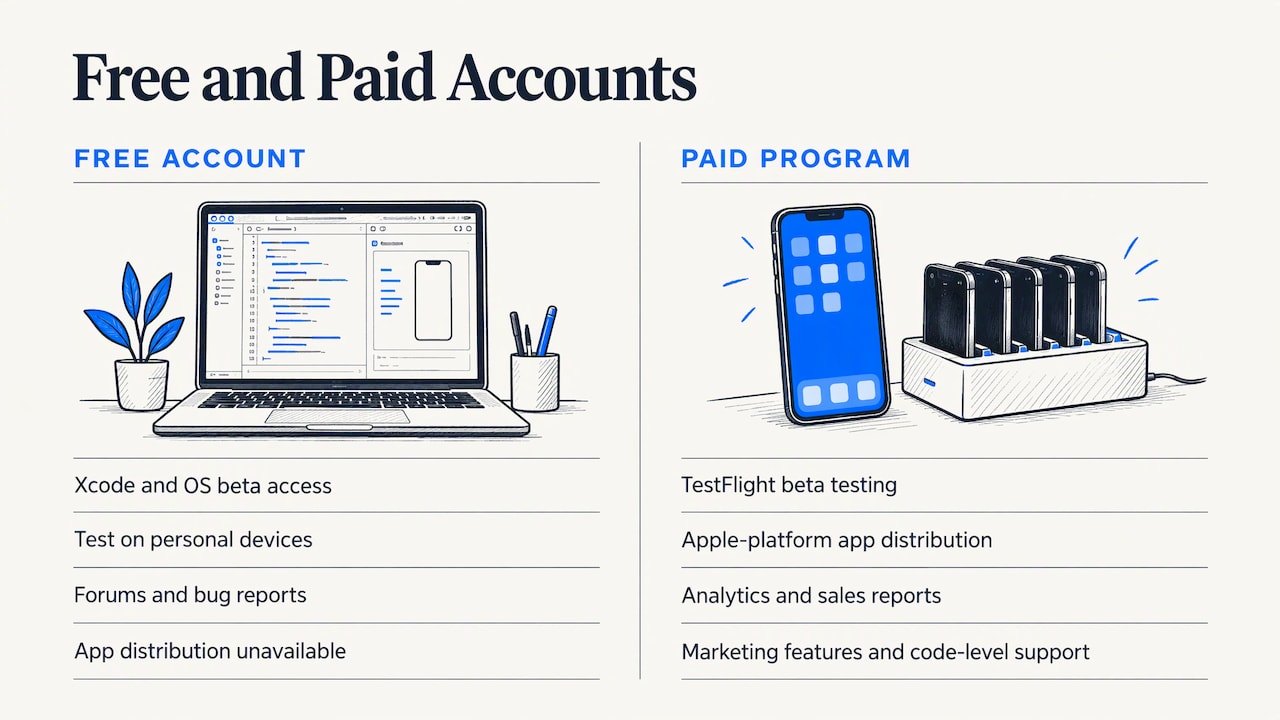
If you plan to launch, you want the paid one. Apple’s capability reference is blunt on this point: holders of a free account cannot distribute apps at all.
Free vs. paid: what each one lets you do
| Free account | Apple Developer Program | |
|---|---|---|
| Cost | $0 | $99 per year |
| Test on your own device | Yes, with a Personal Team in Xcode | Yes |
| Limits | 10 App IDs, 3 devices, 3 apps per device, 7-day expiry | Full capabilities |
| TestFlight testers | No | Yes |
| Publish on the App Store | No | Yes |
| App Store Connect | No | Yes |
The 7-day expiry matters. Anything you install with a free Personal Team stops working after a week unless you rebuild and reinstall it. That is fine for a weekend experiment and useless for customers.
There is also a separate Apple Developer Enterprise Program at $299 per year. It is for large organizations that distribute internal mobile apps privately to employees. If you want customers to download from the App Store, the standard $99 program is the one.
Nonprofits, accredited educational institutions and government entities can apply for a fee waiver.
Individual or organization: which to choose
This choice shapes your App Store listing, so make it deliberately.
Individual (including sole proprietor). Your personal legal name appears as the seller on the App Store. Apple requires an Apple Account with two-factor authentication, that you be of legal age of majority, and your legal name in the first and last name fields. Nicknames, aliases or a company name in those fields cause delays. Apple also verifies your email, phone and address, and P.O. boxes are not accepted.
Organization. The company name appears as the seller, which is what most startups and enterprises want. According to Apple’s enrollment requirements, you need:
- a legal entity,
- a D-U-N-S Number,
- legal authority to bind the organization to agreements,
- a work email on the organization’s domain,
- a public, working website.
A D-U-N-S Number is a nine-digit business identifier issued by Dun & Bradstreet. They are free in most jurisdictions. A new one can take up to 5 business days to arrive, plus up to 2 more business days for Apple to receive the information. If you don’t have one yet, request it first and let the clock run while you prepare everything else.
If you are not the owner or founder, Apple may ask for a reference who can confirm your authority, and may request notarized business documents. For individuals, Apple can also ask for a government ID number or a photo ID image.
A simple rule: a founder building something under a registered company should enroll as an organization. A one-person side project can enroll as an individual and keep it simple. A sole proprietor who applies as an organization without a registered entity is a classic cause of stalled enrollments.
How long enrollment takes
Apple publishes no single approval deadline. For individuals the process can be quick. For organizations, the D-U-N-S step and Apple’s verification are where the days go. Apple Developer Support verifies the information and emails next steps before you can purchase.
Plan for this like a shipping date, not a checkout. If you want your mobile app live in a given week, start enrollment before the mobile app is finished. The account and the mobile app can be prepared in parallel.
Why enrollments get stuck, and how to avoid it
Most stalls trace back to a short list of avoidable details:
- A name that isn’t your legal name. Use the name on your government ID, exactly.
- A P.O. box. Use a street address.
- Two-factor authentication switched off. Turn it on for the Apple Account before you start.
- Mismatched entity type. Choose individual or organization based on what you legally are.
- A work email on a free domain for an organization. Apple wants an address on the organization’s own domain.
- A website that doesn’t load. The organization’s site must be public and functional.
Use one Apple Account that the business controls, not a personal account of a contractor who might leave. Software Lifecycle’s guide makes a related point worth copying: a lapsed membership makes your mobile apps unavailable for download, so put the annual renewal date in a company calendar, not in one person’s head.
What membership gives you once you’re in
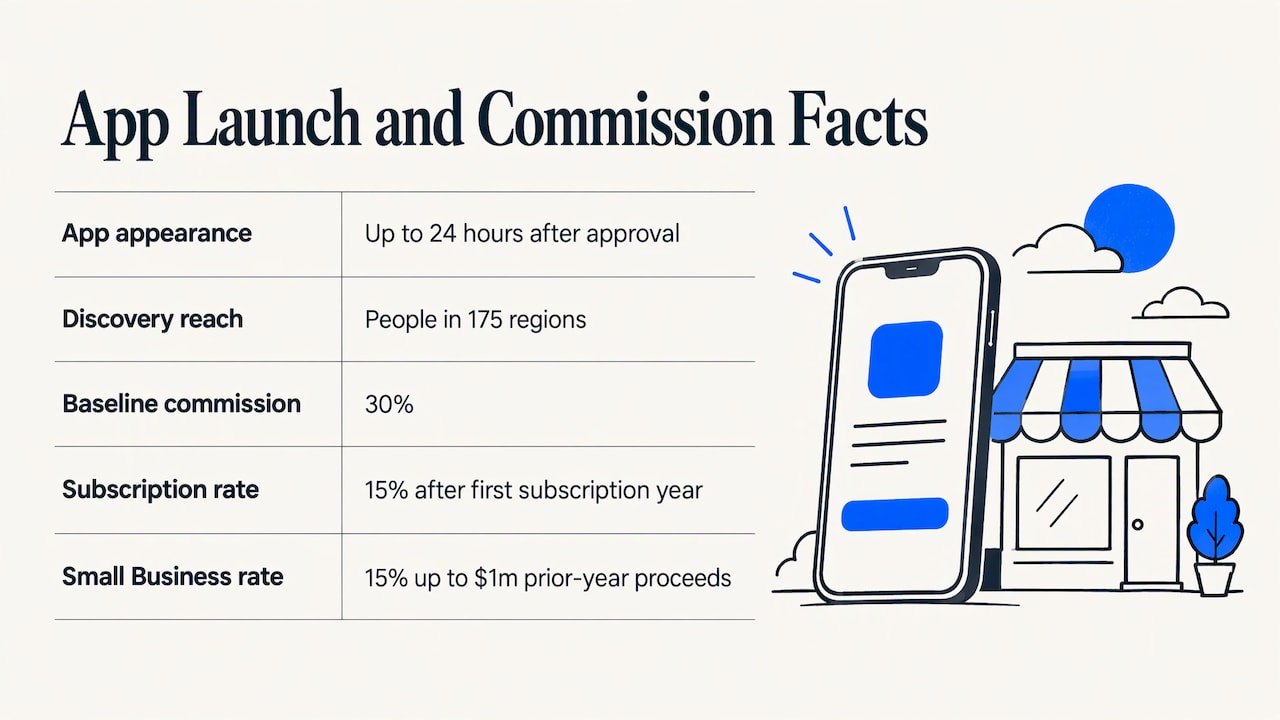
Once you are a member, Apple’s App Store Get Started page lists the tools: testing with TestFlight, submission and tracking in App Store Connect, and analytics after launch. Apple reviews every mobile app and update before it goes live. After approval, a mobile app can take up to 24 hours to appear, and people in 175 regions can discover it.
Commissions are worth knowing about early if your mobile app will sell anything. Software Lifecycle reports a baseline 30% commission, dropping to 15% for subscriptions after a customer’s first year and for Small Business Program members with up to $1 million in prior-year proceeds.
Testing is the other practical point. Your mobile app should be tried on a physical iPhone before release. If the phone is secondhand, make sure it is not stuck behind a previous owner’s sign-in: the Activation Lock meaning is worth understanding before you buy a test device.
The real risk: a mobile app nobody uses or shares
Getting the account is the paperwork. The bigger problem comes after approval. Most new mobile apps launch and are never used or shared. They sit in the store with a handful of downloads because nothing in them gives people a reason to pass them on.
A good mobile app is like a good meal: it is meant to be shared. Pujo builds mobile apps made to spread and drive engagement, with share features and third-party integrations built in from the start. Growth after launch is work Pujo does for you, so you don’t have to turn into a marketing team the week you ship.
Build and ship with Pujo
Pujo is for founders, marketing teams, enterprise teams, designers with a Figma mobile app design, developers and non-developers who want a native iOS and Android mobile app launched to the app stores without writing code. Pujo handles building and publishing, and takes the growth work off your hands. You buy AI credits in packs, Starter and Pro, and use them to build and launch. See the options on the Pujo packs page, or start at Pujo to build and launch your mobile app.
If you already have a Figma design, Pujo can turn it into a published mobile app with no code.
How to get an Apple developer account with Pujo
The path from nothing to a published iPhone mobile app has three parts, and Pujo covers the building and publishing of them:
- Get your Apple Developer Program membership. This is the one step that has to be yours, because the account belongs to you or your company. The next section walks through it.
- Build your mobile app in ZipPad. ZipPad is where you build with Pujo. You message Pujo, answer its questions, and watch your mobile app take shape in ZipPad’s phone preview.
- Tap Publish to app stores. Pujo guides you through each store step in the chat, so you are never staring at a form wondering what comes next.
Pujo can publish for you, so you don’t need to learn Xcode, certificates or provisioning to reach the App Store. What you bring is the account.
How to get your Apple developer account ready to publish with Pujo
Do these steps in order. Most of them take minutes. The only slow part is Apple’s verification.
Step 1: Prepare your Apple Account
Sign in at Apple’s developer site with an Apple Account the business will keep. Turn on two-factor authentication. Check that the name on the account is your legal name, with no nicknames or company name in the name fields.
Step 2: Decide individual or organization
If a registered company will own the mobile app, choose organization. If it’s you personally, choose individual. If you are not the owner or founder of the company, line up a person who can confirm your authority to sign for it.
Step 3: Gather what Apple will ask for
Individuals: legal name, phone number and a street address. Organizations: legal entity name, D-U-N-S Number, a work email on the company domain, and a public website that loads. If you need a D-U-N-S Number, request it now, because it can take up to a week to arrive and be passed to Apple.
Step 4: Enroll and pay
Start enrollment on Apple’s enrollment page and pay the $99 membership fee, unless you qualify for a waiver. Use a payment card in your own or your company’s name. Organizations purchase after Apple Developer Support verifies the details and emails the next steps.
Step 5: Wait for confirmation
When Apple confirms your membership, you are ready to publish. Keep the confirmation email and note the renewal date in a shared company calendar.
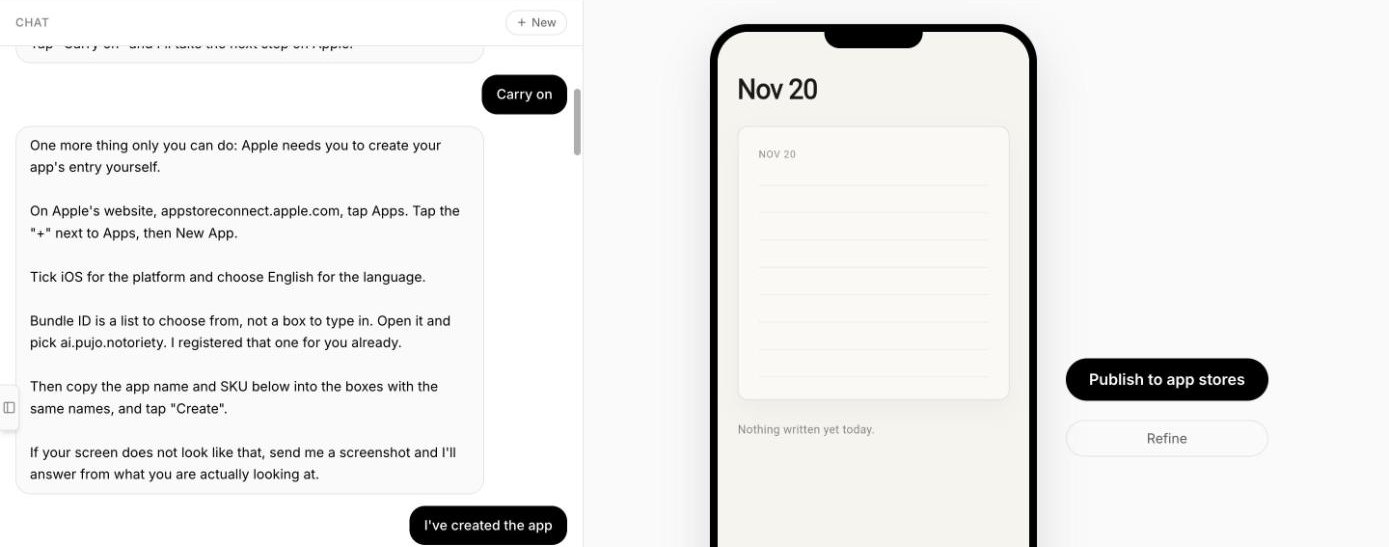
Step 6: Message Pujo in ZipPad
Open ZipPad and message Pujo. Pujo asks you questions about your mobile app, and you answer them. The phone preview in ZipPad shows your mobile app as it comes together, so you can react to it on the spot.
Step 7: Tap Publish to app stores
When you like what you see in the phone preview, tap Publish to app stores. Pujo then guides each store step in the chat, including the Apple step that uses your new developer account. You answer in plain words and Pujo keeps you moving.
Step 8: Wait for review and go live
Apple reviews your mobile app. Once approved, it can take up to 24 hours to show up in the App Store. From there, Pujo handles the growth work so your mobile app gets shared instead of sitting unseen.
FAQ
Is an Apple developer account free?
Signing up for a basic account is free. You get beta software, device testing and the forums. Publishing on the App Store requires the paid Apple Developer Program at $99 per year.
Can I publish a mobile app with a free Apple developer account?
No. A free account can’t distribute mobile apps, and anything installed through a free Personal Team expires after 7 days. You need the paid membership to reach the App Store.
How long does Apple developer enrollment take?
Apple doesn’t publish one deadline. Individuals are often quicker, while organizations wait on the D-U-N-S Number (up to 5 business days, then up to 2 more for Apple to receive it) and Apple’s verification. Starting enrollment early is the best protection.
Do I need a Mac to publish with Pujo?
You build and preview your mobile app in ZipPad, and Pujo guides you through each store step in the chat. What you need is the Apple Developer Program membership itself.
Sources
Have an idea for an app? Describe it, and Pujo builds it for iPhone and Android.
Start a conversation with Pujo